
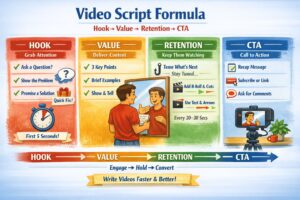
Why Script Structure Matters
A clear video script structure isn’t about reading from paper — it’s a thinking framework that helps creators stay concise, deliver value, and keep viewers engaged.
A good structure:
- speeds up filming
- reduces editing time
- increases retention
- boosts conversions (subs, clicks, sales)
1. HOOK — Grab Attention in 3–5 Seconds
Goal: stop the scroll.
Formula
Problem → Promise → Contrast
Examples
- “Your videos look flat? Here’s how to fix lighting in 2 minutes.”
- “Everyone thinks you need expensive gear. You don’t.”
Tips
- No greetings at the start
- Use a question, emotion, or bold statement
- Add a visual action (gesture, movement, cut)
2. VALUE — Deliver the Core Content
Goal: give clear, practical information.
Formula
3 key points → short examples → visual proof
Principles
- One idea per segment
- Short sentences
- Show, don’t tell
- Use simple language
When planning your video script structure, focus on one idea per segment.
If a viewer can summarize your idea in 10 seconds, you nailed it.
3. RETENTION — Keep Viewers Watching
Goal: maintain attention until the CTA.
Techniques
- Mini‑hooks: “And here’s the part most people miss…”
- Change framing or angle
- Add B‑roll or text overlays
- Use micro‑transitions every 20–30 seconds
The brain treats each change as “new information,” increasing watch time.
4. CTA — Call to Action
Goal: guide the viewer to the next step.
Formula
Summary → Action → Motivation
Examples
- “If this helped, subscribe for the next guide.”
- “Download the checklist — link below.”
- “Try this method and tell me how it worked.”
CTA should feel natural, not salesy.
5. How to Write Scripts Fast (Without Fluff)
Steps
- Define one goal for the video
- Outline Hook → Value → Retention → CTA
- Write bullet points, not full sentences
- Read aloud and cut anything unnecessary
- Add visual cues (gesture, cut, overlay)
- Record a quick test and adjust pacing
Golden Rule
If a sentence doesn’t add value — remove it.
A strong video script structure improves retention and makes editing easier.
6. Mini Script Template
Code
HOOK: [question, contrast, emotion]
VALUE: [3 points + examples]
RETENTION: [mini-hook + visual change]
CTA: [summary + action]
Example:
Code
HOOK: Think good audio requires expensive gear?
VALUE: Here are 3 ways to improve sound for free.
RETENTION: And at the end — my outdoor trick.
CTA: Subscribe if you want the lighting guide next.
Conclusion
The Hook → Value → Retention → CTA structure turns chaotic speech into a clean, powerful script. It helps you write faster, speak clearer, and keep viewers engaged from start to finish.
Creator Basics: A Practical Guide for Beginner Video Makers
- Part 1: Starting a Video Channel: Only When You Can’t Not Do It
- Part 2: How to Choose Your Channel’s Topic and Style
- Part 3: Equipment for Beginner Video Creators
- Part 4: Light, Sound & Framing: Essential Visual Literacy for Beginner Creators
- Part 5: Tips for speaking on camera
- Part 6: Script & Structure: Hook → Value → Retention → CTA (current article)
- Part 7: Editing for Beginners
- Part 8: Content Plan & Publishing Discipline
- Part 9: How to Grow Your Channel: Algorithms, Tags, Thumbnails
- Part 10: First Money: Monetization Without Illusions
- Part 11: AI and the Collapse of Traditional Video Production: What Creators Need to Know in 2025–2030
The following Russian‑language articles served as foundational references while preparing this guide. They offer beginner‑level perspectives on starting a video channel and reflect common advice shared in early creator communities:
- “How to Become a Video Blogger: Tips for Beginners” — an overview of basic steps, early decisions, and common mistakes new creators face when starting a channel.
- “How to Become a Video Blogger: Advice for New Creators” — a short introduction to choosing a topic, preparing for on‑camera work, and understanding the psychological side of public content creation.
- “20 Useful Tips for Beginner Video Bloggers” — a practical list of recommendations focused on discipline, consistency, and the technical basics of filming and publishing videos.