
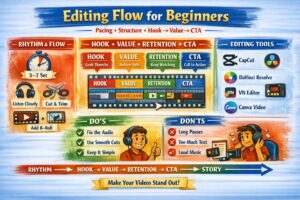
Editing for Beginners: How to make your videos clean, dynamic, and easy to watch.
Why Editing Matters More Than Effects
Most beginners think editing is just “cutting out pauses.” In reality, editing is the second stage of directing — the moment where rhythm, clarity, and emotional impact are created.
Good editing:
- makes your video feel alive
- hides filming mistakes
- improves pacing and comprehension
- increases retention and watch time
1. Editing for Beginners: Rhythm & Flow
Editing is like breathing. Too fast — the viewer feels overwhelmed. Too slow — they lose interest.
Balance Rule
Add a visual change every 3–7 seconds (cut, zoom, text, B‑roll, gesture).
Pro Tip
Listen to your video with your eyes closed. If the rhythm of speech feels natural, the edit will feel natural too.
2. Using Hook → Value → Retention → CTA in Editing
This structure works not only for scripting — but also for editing.
HOOK — The First 5 Seconds
- remove everything unnecessary
- start with action, movement, or a bold statement
- add a visual accent (text, gesture, sound cue)
VALUE — Deliver the Message
- keep only meaningful sentences
- cut long rambles
- add clarifying overlays, examples, or B‑roll
RETENTION — Keep Viewers Watching
- micro‑transitions every 20–30 seconds
- change framing or angle
- add reactions, zooms, or text highlights
CTA — Clean and Simple
- short, clear, and direct
- avoid heavy effects
- leave 2–3 seconds of silence after the CTA — it increases impact
3. Essential Tools for Beginner Editors
Simple & Free
- CapCut — perfect for short‑form content
- DaVinci Resolve — powerful, cinematic, free
- VN Editor — fast and intuitive on mobile
- Canva Video — great for simple cuts and titles
Tip: Don’t chase effects. Focus on clean audio and logical pacing.
4. How to Edit Fast Without Losing Quality
Step‑by‑step:
- Start with structure, not details Divide footage into Hook, Value, Retention, CTA.
- Fix audio first Good sound makes any footage feel better.
- Use keyboard shortcuts This doubles your editing speed.
- Save templates Reuse intros, titles, transitions.
- Cut aggressively Short and clear beats long and boring.
5. Visual Cleanliness & Style
Golden Rule
One video — one visual style.
- use 1–2 fonts max
- avoid mixing random colors
- keep transitions minimal
- don’t let music overpower your voice
- leave breathing room — don’t fill the entire screen
6. Editing for Beginners: Common Mistakes
- long pauses between sentences
- abrupt cuts with no logic
- music too loud
- no pacing — video feels “heavy”
- too much text on screen
How to fix
Watch your video without sound. If the visuals still make sense — the edit works.
Conclusion
Editing is the art of rhythm and meaning. It turns raw footage into a story that feels alive, clear, and engaging. Focus on structure, pacing, and simplicity — and your videos will instantly look more professional.
Creator Basics: A Practical Guide for Beginner Video Makers
- Part 1: Starting a Video Channel: Only When You Can’t Not Do It
- Part 2: How to Choose Your Channel’s Topic and Style
- Part 3: Equipment for Beginner Video Creators
- Part 4: Light, Sound & Framing: Essential Visual Literacy for Beginner Creators
- Part 5: Tips for speaking on camera
- Part 6: Script & Structure: Hook → Value → Retention → CTA
- Part 7: Editing for Beginners (current article)
- Part 8: Content Plan & Publishing Discipline
- Part 9: How to Grow Your Channel: Algorithms, Tags, Thumbnails
- Part 10: First Money: Monetization Without Illusions
- Part 11: AI and the Collapse of Traditional Video Production: What Creators Need to Know in 2025–2030
The following Russian‑language articles served as foundational references while preparing this guide. They offer beginner‑level perspectives on starting a video channel and reflect common advice shared in early creator communities:
- “How to Become a Video Blogger: Tips for Beginners” — an overview of basic steps, early decisions, and common mistakes new creators face when starting a channel.
- “How to Become a Video Blogger: Advice for New Creators” — a short introduction to choosing a topic, preparing for on‑camera work, and understanding the psychological side of public content creation.
- “20 Useful Tips for Beginner Video Bloggers” — a practical list of recommendations focused on discipline, consistency, and the technical basics of filming and publishing videos.