
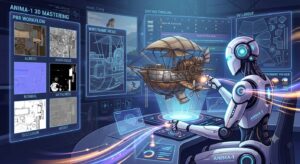
AI is transforming 3D modeling from a slow craft into a fast, iterative idea pipeline
Traditional 3D modeling has always been one of the most labor‑intensive parts of production: artists manually built geometry, unwrapped UVs, painted textures, created materials, and assembled environments. AI for 3D Modeling is rapidly changing how artists create objects, textures, and environments, making the entire 3D workflow faster, more flexible, and more accessible. You can generate a 3D object from a text prompt, create realistic textures from a single photo, or build an entire environment from a short description.
AI doesn’t replace 3D artists — it turns them into super‑artists who work faster, explore more ideas, and spend less time on repetitive tasks.
AI‑Generated 3D Objects from Text and Images
Today’s AI models can create 3D objects from:
- text descriptions
- reference images
- sketches
- photos
- video frames
- combinations of multiple inputs
What you can generate:
- characters
- props
- furniture
- architecture
- vehicles
- weapons
- stylized assets (low‑poly, toon, voxel)
Tools:
- Luma Genie — text → 3D object, extremely fast
- Tripo AI — 3D from photos
- Sloyd AI — parametric modeling enhanced with AI
- Masterpiece Studio — character creation
- Kaedim — automated game‑ready modeling
Practical benefits:
- rapid prototyping
- props for animation
- assets for AR/VR
- 3D elements for storyboards
- accelerated game development pipelines
AI‑Generated Textures and Materials
AI can produce:
- full PBR texture sets (albedo, roughness, normal, metalness)
- procedural materials
- stylized textures
- seamless surfaces
- multiple variations of existing materials
Tools:
- Substance Alchemist AI — PBR from real‑world photos
- Materialize AI — normal and height map generation
- Krea Texture Generator — stylized materials
- Leonardo AI — game‑ready textures
Use cases:
- turning a photo of wood into a complete PBR material
- generating 20 variations of a brick wall
- creating stylized textures for a game
- preparing materials for environment building
AI‑Generated Environments and Scenes
AI can create:
- architectural interiors
- natural landscapes
- sci‑fi environments
- fantasy worlds
- cityscapes
- game levels
- HDRI skyboxes
Tools:
- Blockade Labs Skybox AI — HDRI and panoramic environments
- Luma Field — 3D scanning + AI enhancement
- NVIDIA GauGAN — landscape generation
- Spline AI — web‑ready 3D environments
Benefits:
- fast concept development
- background geometry for animation
- level prototypes
- client visualization
- mood and atmosphere exploration
AI Acceleration of the Traditional 3D Pipeline
AI doesn’t just generate content — it speeds up the entire workflow.
1. Automatic Retopology
Clean topology suitable for animation.
2. Automatic UV Unwrapping
Fast, consistent UVs without manual work.
3. Model Optimization
LOD generation, polygon reduction.
4. AI Rigging
Automatic skeleton setup.
5. AI Animation
Quick motion generation for characters.
Tools:
- Blender AI add‑ons
- Adobe Sensei
- Cascadeur AI
- DeepMotion
- Plask AI
Where AI 3D Modeling Is Used Today
Games
Fast asset creation, props, environments, materials.
Animation
Backgrounds, objects, textures, characters.
AR/VR
Interactive 3D assets for virtual spaces.
Architecture
Concepts for interiors and exteriors.
E‑commerce
Product models for 3D catalogs.
Education
Quick creation of teaching materials.
Limitations and Reality Check
AI is powerful, but not perfect:
- generated meshes often need cleanup
- topology may be messy
- UVs aren’t always optimal
- materials can feel generic
- environments may require manual refinement
But as a speed booster, AI is already indispensable.
Conclusion
AI‑powered 3D modeling is not a replacement for human artists — it’s an accelerator that:
- removes repetitive tasks
- speeds up prototyping
- enables rapid iteration
- opens 3D creation to non‑experts
- makes production more flexible and efficient
AI turns 3D modeling into an interactive conversation with the tool, not a slow manual process.
For a broader industry perspective, see this external analysis of how AI is reshaping video production workflows and accelerating the shift toward automated filmmaking.
“AI in Creative Production” Series
- Part 0: AI and the Collapse of Traditional Video Production: What Creators Need to Know in 2025–2030
- Part 1: AI for Ideas and Topic Research: How Creators Can Use AI to Generate Topics, Validate Demand, and Find Unique Angles
- Part 2: AI for Scriptwriting and Story Structure: How to Build Hooks, Flow, and Retention with AI as Your Co‑Author
- Part 3: AI for Video Creators: Preparing for a Shoot with Storyboards, Shot Lists, Checklists, and Smart Prompts
- Part 4: AI for Editing: Automating Cuts, Music, Rhythm, Subtitles, and B‑roll in 2026
- Part 5: AI for Visuals: Thumbnails, Infographics, Styling, Frames, and Illustrations in 2026
- Part 6: AI for Voice and Audio
- Part 7: AI for Analytics and Channel Growth
- Part 8: AI as Your Personal Producer
- Part 9: Shorts with AI: From Viral Idea to Final Cut
- Part 10: AI Animation: From Static Frame to Motion
- Part 11: AI for 3D Modeling — Generating Objects, Textures, and Environments (current article)
- Part 12: AI for Simulation — Generate Worlds, Physics & Behaviors
- Part 13: AI for Motion Design: Titles, Transitions, and Visual Effects
- Part 14: AI for Cinematic Production — Integration with Editing and Sound