
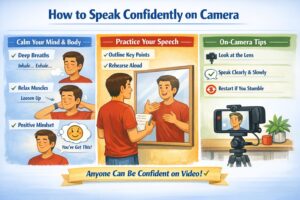
How to speak confidently on camera starts with mindset, breathing, and structure. You don’t need charisma — you need technique. Beginners improve fastest by using a repeatable speech framework, calming physical tension, and reframing the lens as a friendly listener.
Here’s a complete guide for beginner creators, based on expert insights:
Why Speaking on Camera Feels Difficult
Even confident people freeze when the camera turns on. That’s normal. The camera removes all social feedback — no nods, no smiles, no reactions — so your brain interprets it as a “performance,” not a conversation.
- fear of judgment
- tension in the shoulders, jaw, and breath
- overthinking every word
- trying to sound “perfect.”
- losing the thread mid‑sentence
The solution is not talent — it’s technique.
1. Psychology: Reframing the Camera
Think of the lens as one person, not an audience
Imagine your ideal viewer: friendly, curious, supportive. Speak to them, not “to the internet.”
Lower the stakes
You’re in full control here. You can stop anytime and restart as many times as you need. This removes 80% of the pressure.
Accept imperfection
Small mistakes make you human. Viewers trust authenticity more than flawless delivery.
2. Breathing & Body: The Foundation of Confidence
Breathing Techniques
- Low belly breathing — inhale through the nose, expand the stomach, slow exhale.
- Box breathing — 4 seconds inhale → 4 hold → 4 exhale → 4 hold.
- Double‑sigh reset — two quick inhales + long exhale (reduces tension instantly).
Physical Warm‑Up
- Shoulder rolls
- Jaw loosening (side to side)
- Humming or lip trills
- Light stretching to open posture
A relaxed body = a confident voice.
3. Speech Structure: The 3‑Point Framework
One way to learn how to speak confidently on camera is to use a repeatable speech framework.
Most beginners ramble because they try to memorize. Instead, use a simple outline:
– Opening Line
A clear, short sentence that sets the topic.
– Three Key Points
Your “chapters.” Example: Problem → Solution → Example.
– Closing Line
A summary or call to action.
This structure keeps you focused and reduces anxiety.
4. Voice, Pacing & Eye Contact
Voice
- Speak 10–15% slower than normal
- Use pauses instead of filler words
- End sentences cleanly
Eye Contact
- Look at the lens, not the screen
- Put a small sticker near the lens as a target
- Imagine talking to one person
Body Language
- Relaxed shoulders
- Hands visible or gently gesturing
- Avoid fidgeting or touching your face
5. Handling Mistakes Like a Pro
Beginners often worry about mistakes, but learning how to speak confidently on camera means accepting imperfection and restarting calmly.
If you stumble:
Pause → smile → restart the sentence. This looks natural on camera.
If you blank out:
Glance at your outline, breathe, continue.
If you sound stiff:
Add emotion. Emphasize key words. Smile slightly — it changes your tone.
If anxiety spikes:
Stop recording, reset your breath, start again. You’re in control.
6. Quick Checklist Before Recording
Mindset
- Talking to one friendly viewer
- Not a performance
Breathing
- Low, calm, steady
Voice
- Warmed up
- Clear pacing
Structure
- Opening line
- 3 points
- Closing line
Presence
- Eye contact with lens
- Relaxed posture
Final Thought
Speaking confidently on camera is a skill built through repetition, not personality. With the right breathing, structure, and mindset, anyone can look natural, calm, and engaging on video.
Creator Basics: A Practical Guide for Beginner Video Makers
- Part 1: Starting a Video Channel: Only When You Can’t Not Do It
- Part 2: How to Choose Your Channel’s Topic and Style
- Part 3: Equipment for Beginner Video Creators
- Part 4: Light, Sound & Framing: Essential Visual Literacy for Beginner Creators
- Part 5: Tips for speaking on camera (current article)
- Part 6: Script & Structure: Hook → Value → Retention → CTA
- Part 7: Editing for Beginners
- Part 8: Content Plan & Publishing Discipline
- Part 9: How to Grow Your Channel: Algorithms, Tags, Thumbnails
- Part 10: First Money: Monetization Without Illusions
- Part 11: AI and the Collapse of Traditional Video Production: What Creators Need to Know in 2025–2030
The following Russian‑language articles served as foundational references while preparing this guide. They offer beginner‑level perspectives on starting a video channel and reflect common advice shared in early creator communities:
- “How to Become a Video Blogger: Tips for Beginners” — an overview of basic steps, early decisions, and common mistakes new creators face when starting a channel.
- “How to Become a Video Blogger: Advice for New Creators” — a short introduction to choosing a topic, preparing for on‑camera work, and understanding the psychological side of public content creation.
- “20 Useful Tips for Beginner Video Bloggers” — a practical list of recommendations focused on discipline, consistency, and the technical basics of filming and publishing videos.