
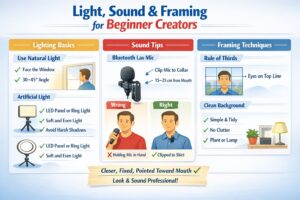
How to make your videos look clean, bright, and professional — even with a smartphone
Why Visual Literacy Matters More Than Your Camera
Most beginners assume video quality comes from the camera. In reality:
- Lighting shapes 60% of perceived quality
- Sound shapes another 30%
- Framing & composition shape the final 10%
- The camera simply records the result
This means even a basic smartphone can produce “professional‑looking” content if you understand the fundamentals.
1. Visual Literacy for Beginner Creators: Lighting Basics
Use Natural Light Whenever Possible
A window is essentially a free softbox.
Best setup:
- Face the window
- Angle your face 30–45° to the light
- Avoid direct sunlight
- Keep the background slightly darker than your face
Avoid:
- Window behind you (silhouette)
- Strong side light without fill
Artificial Lighting: Simple Options That Work
If you film indoors or at night, you only need one good light source.
Best budget options:
- LED panel (5600K)
- 12–14″ ring light
Correct placement:
- Slightly above eye level
- 30–45° angle
- 50–100 cm distance
- Use a diffuser (softbox, paper, fabric)
Avoid:
- Lighting from below
- Harsh direct light
- RGB lights on your face
2. Sound: The First Thing Viewers Notice
Why Sound Matters More Than Video
Viewers will tolerate mediocre visuals, but bad audio makes them leave instantly.
Bluetooth Lavalier Mics: The Best Choice for Beginners
Wireless lav mics give you:
- consistent audio
- freedom to move
- no cables
- easy mounting on clothing or a hat
Correct clothing placement:
- Clip to collar or neckline
- 15–25 cm from the mouth
- Mic pointing downward
- No fabric rubbing
Correct hat placement:
- Clip to the edge of a beanie
- Mic pointing downward
- Avoid thick wool hats
- Keep the capsule uncovered
Incorrect usage:
- Holding the mic in your hand
- Hiding it under thick clothing
- Pointing the capsule upward
- Wearing it too low
3. Framing: Make Your Video Pleasant to Watch
The Rule of Thirds
Divide the frame into a 3×3 grid. Your eyes should sit on the top horizontal line.
This instantly makes your shot look intentional and professional.
Choose a Clean, Calm Background
Avoid:
- messy rooms
- open closets
- kitchen counters
- random clutter
Better options:
- plain wall
- simple shelf
- soft backlight
- plant or lamp in the background
Camera Distance & Angle
Ideal setup:
- Camera at eye level
- Distance: arm’s length
- Slight downward tilt (very slight)
Avoid:
- Too close (distortion)
- Too far (loss of presence)
- Low angle (unflattering, “webcam look”)
4. Pre‑Recording Checklist
Lighting
- Face is evenly lit
- No harsh shadows
- Background slightly darker
Sound
- Lav mic clipped correctly
- No fabric rubbing
- Quick 5‑second test
Framing
- Eyes on upper third
- Clean background
- Camera at eye level
Technical
- 1080p or 4K
- Stabilization on
- Lens cleaned
Conclusion
Visual literacy isn’t about expensive gear — it’s about understanding light, sound, and framing. Master these three elements, and you can create high‑quality videos with any device, even a budget smartphone.
Creator Basics: A Practical Guide for Beginner Video Makers
- Part 1: Starting a Video Channel: Only When You Can’t Not Do It
- Part 2: How to Choose Your Channel’s Topic and Style
- Part 3: Equipment for Beginner Video Creators
- Part 4: Light, Sound & Framing: Essential Visual Literacy for Beginner Creators (current article)
- Part 5: How to Speak Confidently on Camera
- Part 6: Script & Structure: Hook → Value → Retention → CTA
- Part 7: Editing for Beginners
- Part 8: Content Plan & Publishing Discipline
- Part 9: How to Grow Your Channel: Algorithms, Tags, Thumbnails
- Part 10: First Money: Monetization Without Illusions
- Part 11: AI and the Collapse of Traditional Video Production: What Creators Need to Know in 2025–2030
The following Russian‑language articles served as foundational references while preparing this guide. They offer beginner‑level perspectives on starting a video channel and reflect common advice shared in early creator communities:
- “How to Become a Video Blogger: Tips for Beginners” — an overview of basic steps, early decisions, and common mistakes new creators face when starting a channel.
- “How to Become a Video Blogger: Advice for New Creators” — a short introduction to choosing a topic, preparing for on‑camera work, and understanding the psychological side of public content creation.
- “20 Useful Tips for Beginner Video Bloggers” — a practical list of recommendations focused on discipline, consistency, and the technical basics of filming and publishing videos.